> For the complete documentation index, see [llms.txt](https://docs.subwallet.app/main/llms.txt). Markdown versions of documentation pages are available by appending `.md` to page URLs; this page is available as [Markdown](https://docs.subwallet.app/main/extension-user-guide/account-management/derive-a-new-account-from-an-existing-account/create-a-new-account-derived-from-an-existing-one.md).
# Create a new account derived from an existing one
Create a new account securely by deriving it from your existing one using a custom path.
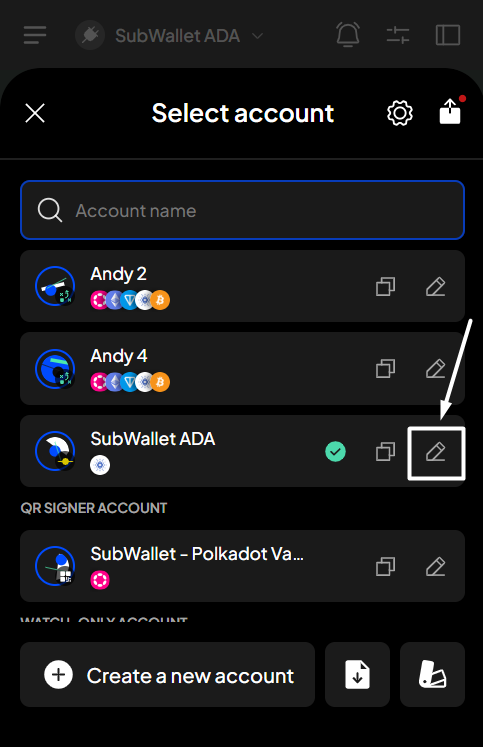
**Step 1**: Open the SubWallet extension and click on the account name to access the account selection tab.
**Step 2**: In the account selection tab, you can choose to create a derived account using either of the following ways:
* Click the "**Create a new account**" button
* Click the pen i**con** next to the account you want to derive
Choose your preferred tab to continue.
{% tabs %}
{% tab title="Click the pen icon" %}
**Step 3**: In the Account details tab, click the "**Derive**" button at the bottom of the screen to start deriving a new account.
**Step 4**: Enter a valid derivation path and a name for your derived account. Once done, click "**Create account**".
**Step 5**: You've successfully created a derived account! Head over to your account list to see it.
{% hint style="info" %}
You can create solo derivative accounts from a unified account by customizing the derivation path to align with the ecosystem's formatted derivative path.
{% endhint %}
{% endtab %}
{% tab title="Click the button" %}
**Step 3**: Choose the "**Derive from an existing account**" button to derive a new account.
**Step 4**: Choose the account you want to derive from.
**Step 5**: Enter a valid derivation path and a name for your derived account. Once done, click "**Create account**".
**Step 6**: You've successfully created a derived account! Head over to your account list to see it.
{% hint style="info" %}
You can create solo derivative accounts from a unified account by customizing the derivation path to align with the ecosystem's formatted derivative path.
{% endhint %}
{% endtab %}
{% endtabs %}


 {% endhint %}
{% endtab %}
{% tab title="Click the button" %}
**Step 3**: Choose the "**Derive from an existing account**" button to derive a new account.
{% endhint %}
{% endtab %}
{% tab title="Click the button" %}
**Step 3**: Choose the "**Derive from an existing account**" button to derive a new account.


 {% endhint %}
{% endtab %}
{% endtabs %}
{% endhint %}
{% endtab %}
{% endtabs %}